

Chief Scientist Attendance Reporting System
The most suitable solution for an attendance system approved and supported by the Chief Scientist:
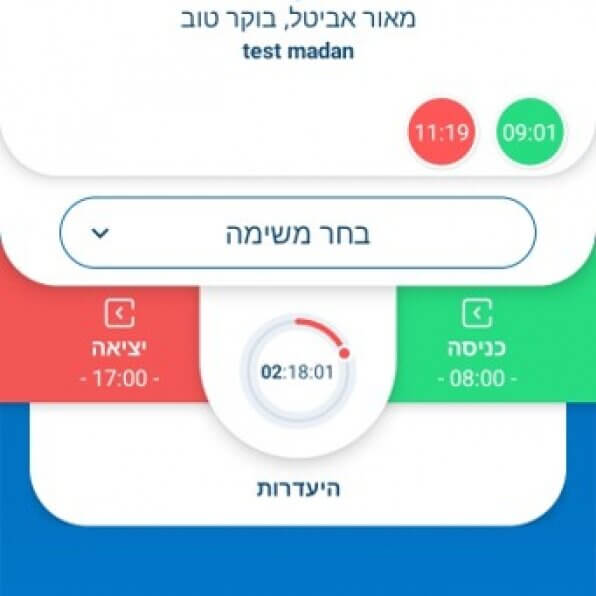
- Location-based time clock with a focus on the mobile app
- Task reporting during working hours
- Ability to switch between tasks throughout the workday
- Option to complete reports, with a notification to the user to avoid retroactive reporting in the future if manual reporting occurs
- Completing a task from an original report is not considered retroactive reporting
- Absence reporting
- Reporting within the company = reporting within predefined polygons:
- Company offices
- Designated work hotspots
- Employees’ homes in remote work mode
- Reporting outside of polygons will be considered manual reporting
- Submitting reports with a digital signature
Submission of a dedicated Project Management Report, divided into two parts:
1. Detailed Attendance Report for the Chief Scientist
- Summary of hours by task
- Calculation of real-time hours (original reports) vs. retroactive hours
- Calculation of hours outside the company (outside polygons): work-from-home or hot spots
- Employment rate – the ratio of hours spent on each task vs. total actual working hours
- Section for employee and manager signatures with declaration of report approval
2. Change Report
Displays all modifications made to reports:
- Addition of a report
- Deletion of a report
- Modification of a report
- Change of project
If the change was made by an employee, the employee’s name will appear.
If made by a manager, the manager’s name or username will be shown.
The report also shows when each change occurred.
Export options: Excel and PDF
- Excel: task details appear horizontally, one row per day, with hours per task in separate columns.
- PDF: each task report is displayed on a separate line.
All other parameters remain the same in both formats.
How to Set Up a Company to Meet Chief Scientist Requirements
- In the company profile, check the “Chief Scientist Company” box.
This enables features specific to Chief Scientist reporting, such as: - A standard Chief Scientist notification after each manual report
- Marking out-of-polygon reporting as manual reporting
System Setup Guidelines:
- Make sure the company is configured with task management in its profile.
- Require task reporting.
- Set up polygons based on work locations (otherwise, all reports will be considered manual).
- Mark each polygon as either “Work from home,” “Hot spot,” or “Office” — required for report calculations.
- If standards are to be added, grant user permission to access standards so they appear in the Chief Scientist report.
- Reports can be digitally signed. When an employee closes a month or a manager approves it, their name and timestamp appear on the signature line.
- To display the manager’s name, define it in the dashboard.
Chief Scientist Requirements
1. Location-based attendance reporting via the Clock2go app
- Attendance and task reporting, including absences
- Easy switching between tasks during the workday or completing them later
- Completing reports in the system or app and monthly approval by a manager
- Reporting from home or predefined hot spots
2. Cellular attendance reporting with location – Exclusive to OK2GO
- For users without the app or as a backup
- Dial *006 to report by voice — real-time reporting with location based on cell tower data
- Exclusive service through partnerships with leading cellular providers: Pelephone, Cellcom, Partner, 012, HOT Mobile
3. Work area management and enforcement
- Attendance reporting from offices and predefined hot spots, plus remote work support
- Clock2go allows drawing work zones on a map for clear time tracking and reporting
- Exclusive polygon enforcement to ensure reporting only from authorized zones
4. Employee portal access
- Each employee receives a secure username and password for cloud access
- Real-time reporting and task logging
- Viewing and completing reports
- Absence reporting with document upload
- Monthly report closure and digital signature
5. Automatic Chief Scientist-approved summary report
- Summary of hours by task
- Employment percentage according to requirements
- Locations by predefined work zones
- Change log of all reporting activity
- Signature and approval section
Join today and ensure your organization works with a fully supported, Chief Scientist-compliant attendance system.

Contact us today for a customized plan tailored to your business.